
How to File a VAT Return: UK Guide 2026 — Free
Learning how to file a VAT return is one of those jobs that looks harder than it is — until the deadline arrives. If your accounting quarter ended on 30 September 2026, your VAT return was due 7 November 2026, and the payment had to reach HMRC by the same date. Miss it and you pick up a penalty point; miss the payment and interest starts running from day one. This guide walks you through the whole job in plain English: what a VAT return actually is, the nine boxes explained one by one, a complete worked example with every figure checked on our live UK VAT calculator, the deadlines, the penalties, and the mistakes that trip up even experienced bookkeepers — including three errors that are still sitting in the top-ranking guides on Google right now.
A VAT return is the form every VAT-registered business sends HMRC, usually every three months, declaring how much VAT it charged its customers and how much VAT it paid its suppliers. The difference is what you owe — or what HMRC owes you. You file one even when nothing happened in the quarter: a nil return is still a return, and a late nil return still earns a penalty point. The registration threshold is £90,000 of taxable turnover over a rolling 12 months (deregistration £88,000), unchanged since 1 April 2024 — if you are anywhere near that line, the return is part of your life now, so it is worth learning to do it properly.
How to File a VAT Return: the 9 Boxes, Step by Step
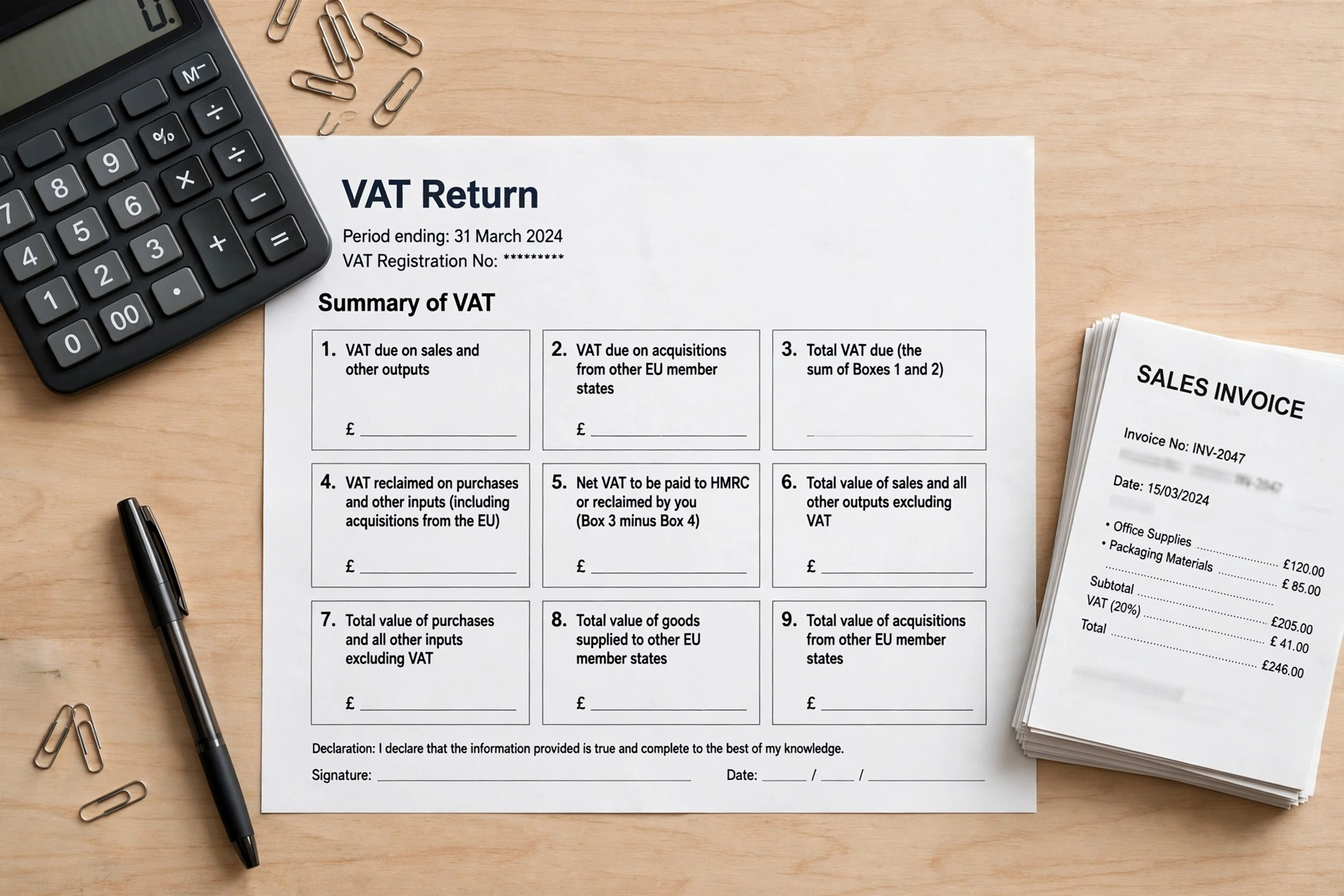
The return itself is nine numbered boxes. Boxes 1 to 5 are the money; boxes 6 to 9 are the totals HMRC uses to check your figures. You enter boxes 1, 2, 4, 6, 7, 8 and 9 yourself; boxes 3 and 5 are calculated for you on the online return (box 3 = box 1 + box 2; box 5 = box 3 − box 4). Here is what goes where, straight from HMRC’s VAT Notice 700/12:
| Box | What goes in it | Watch out for |
|---|---|---|
| Box 1 | VAT due on sales and other outputs | Includes reverse charge VAT, postponed import VAT and fuel scale charges; deduct credit notes you issued. |
| Box 2 | VAT due on acquisitions of goods into Northern Ireland from EU member states | Goods only, Northern Ireland only. Nil for a business in Great Britain. |
| Box 3 | Total VAT due (box 1 + box 2) | Calculated automatically — do not type it in. |
| Box 4 | VAT reclaimed on purchases and other inputs | Needs a valid VAT invoice. No reclaim on business entertaining, private use, or margin-scheme goods. |
| Box 5 | Net VAT to pay or reclaim (box 3 − box 4) | Positive = you pay HMRC. Negative = HMRC repays you, usually within 30 days. |
| Box 6 | Total value of sales and other outputs, excluding VAT | Net sales, not gross. This is the figure the error-correction 1% test is measured against. |
| Box 7 | Total value of purchases and other inputs, excluding VAT | Net purchases, excluding VAT. Leave out anything you cannot reclaim. |
| Box 8 | Total value of supplies of goods from Northern Ireland to EU member states | Nil for most GB businesses. |
| Box 9 | Total value of acquisitions of goods from EU member states into Northern Ireland | Nil for most GB businesses. |
Two boxes cause most of the confusion. Box 2 is the one several top-ranking guides get wrong: it covers goods acquired into Northern Ireland from EU member states — not services, and not Great Britain. If your business is in England, Scotland or Wales, box 2 is zero and box 8 and box 9 are zero too. And box 4 is where people over-claim: you can only reclaim VAT on purchases used for the business, supported by a valid VAT invoice. Business entertaining is never reclaimable, and neither is VAT on goods bought under the second-hand margin scheme.
A Complete Worked Example — Every Figure Checked on the Live Calculator
Most guides explain the boxes and then stop, leaving you to guess how they fit together. Here is a full quarter for a fictional freelance designer, with every number verified on the live calculator on this site — the same add and remove VAT calculator you can use for your own figures. If you are learning how to file a VAT return for the first time, follow this example with your own numbers beside it and the boxes will make sense.
The designer billed £24,000 of standard-rated work in the quarter (net) and £1,200 of reduced-rate work. She bought a laptop and software licences for £6,000 including VAT. Here is the return:
| Box | Figure | How it was worked out |
|---|---|---|
| Box 1 | £4,860.00 | £24,000 × 20% = £4,800.00, plus £1,200 × 5% = £60.00 |
| Box 2 | £0.00 | No acquisitions into Northern Ireland from the EU |
| Box 3 | £4,860.00 | Box 1 + box 2 |
| Box 4 | £1,000.00 | £6,000 gross ÷ 1.20 = £5,000 net, so the VAT inside it is £1,000.00 |
| Box 5 | £3,860.00 payable | £4,860.00 − £1,000.00 |
| Box 6 | £25,200.00 | £24,000 + £1,200, excluding VAT |
| Box 7 | £5,000.00 | Net purchases, excluding VAT |
| Box 8 | £0.00 | No NI-to-EU supplies |
| Box 9 | £0.00 | No EU-to-NI acquisitions |
The three key calculations were run on the live calculator and match exactly: £24,000 add 20% gives VAT £4,800.00 and a total of £28,800.00; £1,200 add 5% gives VAT £60.00 and a total of £1,260.00; £6,000 remove 20% gives VAT £1,000.00 and a net of £5,000.00. If your own quarter looks different, the same checks apply — add VAT to a net figure for box 1, remove VAT from a gross figure for box 4. A second set of spot checks on the calculator confirmed the same accuracy across rates and edge cases: £15,000 add 20% → £3,000.00 VAT; £8,750 add 20% → £1,750.00; £99.99 add 20% → £20.00; £640 add 5% → £32.00; £180,000 add 20% → £36,000.00; a custom 12.5% rate on £9,600 → £1,200.00; and on the remove side, £1,050 remove 20% → £175.00 VAT, £315 remove 5% → £15.00, and £240 remove 20% → £40.00. Zero and zero-rated amounts behave as they should: £2,000 add 0% is £0.00 VAT, and £0 at any rate is £0.00.
The one-line version: box 5 = VAT you charged (box 1) minus VAT you paid (box 4). If box 5 is positive, you pay HMRC. If it is negative, HMRC repays you. Everything else on the return is just the evidence for those two numbers.
Watch the video below — a real screen recording of the calculator working through the three calculations from this example, so you can see the figures appear rather than taking them on trust.
Deadlines — When Your VAT Return Is Due
The deadline is the same for filing and for paying: one calendar month and seven days after the end of your accounting period. Knowing how to file a VAT return also means knowing when it is due — HMRC’s own guidance on VAT returns confirms the timetable. For the standard calendar quarters that works out as:
| Quarter ends | Return and payment due |
|---|---|
| 31 March | 7 May |
| 30 June | 7 August |
| 30 September | 7 November |
| 31 December | 7 February |
Your own periods may be staggered differently — HMRC assigns one of three stagger groups when you register — but the rule is always the same: one calendar month and seven days. Two things catch people out. First, the deadline does not move if it falls on a weekend or a bank holiday: HMRC’s own guidance says the return must be submitted and the payment must reach them on or before the deadline even then. One top-ranking guide currently tells readers the opposite — that the deadline moves to the last working day before — and following that advice would make you late. Second, filing and paying are separate obligations with the same date: a return filed on time but paid a day late is still a late payment, with interest from the first overdue day.
The exception is the Annual Accounting Scheme, covered in our earlier guide to the scheme: annual filers submit one return a year, due two months after the end of the 12-month period, with advance payments on account in between. A guide that tells annual filers the standard one-month-and-seven-days rule is simply wrong for them.

Making Tax Digital — the Software Rule
Since April 2022, almost every VAT-registered business must keep digital records and file through Making Tax Digital (MTD) compatible software. In short, how to file a VAT return in 2026 means: keep digital records, link them to MTD software, and submit from the software. You cannot type the figures into HMRC’s website yourself — the online portal is only available if you use the Annual Accounting Scheme, are exempt from MTD, or have cancelled your registration. A paper return without an exemption can draw a penalty of up to £400. Three top-ranking guides still present the HMRC portal as a general filing option; for a standard quarterly filer it is not.
In practice the flow is: keep your records digitally (invoices, receipts, and your sales and purchase ledgers), link them to your MTD software without retyping — the “digital link” rule — and submit from the software, which talks to HMRC through an application programming interface. Your software’s authorisation with HMRC lasts 18 months and must be renewed, a detail only one of the top ten guides mentions and a real first-time-filer failure point: an expired authorisation means the submission fails on deadline day. If you are newly registered, there is no separate MTD sign-up step any more — HMRC says all VAT-registered businesses should now be signed up, and “you no longer need to sign up yourself”. One guide still tells readers to sign up through an MTD VAT portal that no longer works that way.

How to Pay HMRC
Once box 5 says you owe money, pay by the same deadline — one calendar month and seven days. The reliable methods are bank transfer (Faster Payments, Bacs or CHAPS), debit or corporate credit card online, or Direct Debit. Always use your 9-digit VAT number as the payment reference, or HMRC may not match the payment to your account.
The Direct Debit trap is worth knowing: HMRC collects a Direct Debit three working days after the deadline, so the cash leaves your account later — but the return itself is still due on the 7th, and the Direct Debit must be set up at least three working days before the collection date. If you set it up too late, the payment is late even though you “paid by Direct Debit”. Larger businesses should also know about payments on account: if your annual VAT bill exceeds £2.3 million, HMRC requires monthly payments on account, and only one top-ranking guide mentions this at all.
If box 5 is negative — you reclaimed more than you charged — HMRC usually repays within 30 days of receiving the return. Make sure your bank details are up to date in your VAT online account, or the repayment stalls while HMRC writes to you.
What Happens If You File Late — Penalty Points
For accounting periods starting on or after 1 January 2023, late filing works on a points system. Each late return — including a late nil return and a late repayment return — earns one penalty point. When you reach the threshold for your filing frequency, HMRC charges £200, and £200 more for every further late return while you sit at the threshold.
| Filing frequency | Points threshold | Penalty |
|---|---|---|
| Annual | 2 points | £200, then £200 per further late return |
| Quarterly | 4 points | £200, then £200 per further late return |
| Monthly | 5 points | £200, then £200 per further late return |
Points do not last forever. They clear after roughly two years below the threshold, or after a 12-month clean run at the threshold with all outstanding returns filed. And three returns are exempt from the points system entirely: your first return after registration, your final return after deregistration, and one-off non-standard periods. Almost none of the top-ranking guides explain the clearing rules — and a quarterly filer who files four late returns in a row is already at the £200 penalty before they realise the points were accumulating.
Late Payment Penalties — the Real Rates
Late payment is a separate penalty from late filing, and this is where the top ten guides are at their worst. One of them — currently ranking in the top ten — states the late-payment rates as 2% at 16–30 days, a further 2% after 30 days, and daily penalties of 4% per year. Every one of those numbers is wrong. The correct rates, from HMRC’s guidance on how late payment penalties work if you pay VAT late, are:
- Up to 15 days overdue: no penalty — but interest runs from day one.
- 16 to 30 days overdue: a first penalty of 3% of the VAT outstanding at day 15.
- 31 days or more overdue: the first penalty rises by a further 3% of the amount outstanding at day 30 (6% in total), plus a second penalty accruing daily at 10% per year on the outstanding balance from day 31.
HMRC’s own worked example makes the difference concrete. On a £15,000 VAT bill paid 51 days late: the first penalty is £450 at day 15 (3% of £15,000), rising to £900 at day 30 (another 3%), and the daily second penalty adds £86.30 by day 51 — a total penalty of £986.30, before interest. Follow the wrong rates in that top-ten guide and you would budget roughly a third less. Late-payment interest, currently 7.75% (Bank of England base rate 3.75% plus four percentage points, from 9 January 2026), runs from the first overdue day regardless of the penalty timetable. If you cannot pay, ask HMRC for a Time to Pay arrangement before the 15-day mark: an arrangement agreed in time can mean lower penalties or none at all, and the online route is available for debts under £100,000 if all your returns are filed and you have no other active arrangements.
Fixing a Mistake — and the Form That No Longer Exists
Errors happen — a wrong rate, a missed invoice, a duplicated sale. What you do depends on the size of the net error:
- Net error of £10,000 or less: adjust it on your next return — add it to box 1 if you owe HMRC, or to box 4 if HMRC owes you.
- Net error between £10,000 and £50,000, and under 1% of your box 6 sales: you may also adjust it on the next return.
- Net error over £50,000, or over £10,000 and over 1% of box 6 sales, or any deliberate error: disclose it to HMRC separately. Deliberate errors can never be netted off on a return, and the correction window is four years.
Here is the correction three of the top ten guides still get wrong. They all tell readers to disclose larger errors on form VAT652. HMRC withdrew form VAT652 on 8 September 2025. There is no VAT652 any more. Larger and deliberate errors must now be disclosed through HMRC’s online error-correction service via Government Gateway, or in writing to the VAT Error Correction Team (BT VAT, HMRC, BX9 1WR). The thresholds above are unchanged — only the channel changed — but a guide that sends you looking for a withdrawn form wastes your time at exactly the moment the clock matters. Only one of the top ten pages states the withdrawal correctly.
If HMRC Sends You an Assessment
Miss a deadline and HMRC may send a VAT notice of assessment — their estimate of what you owe. It is not the final word. If the assessment is too high, send the correct return and pay the right amount, and the assessment is replaced. If it is too low, tell HMRC within 30 days or send a correct return and payment — stay silent and you can face a penalty of up to 30% of the assessment. Only one of the top ten guides explains this at all; the rest leave readers thinking an assessment is a bill that cannot be challenged.
The Bits Most Guides Skip
EC Sales List. If your business is registered for VAT in Northern Ireland and you supply goods to the EU, those sales go on your VAT return and you must also complete an EC Sales List. Not one of the top ten guides explains what it is, who files it, or its deadline.
Bad debt relief. If a customer never pays, you can reclaim the VAT you charged on the sale — but only if the debt is more than six months old, you claim within four years and six months of the payment due date or date of supply (whichever is later), the debt has not been sold on, and you charged no more than the normal price. Only one top-ten page mentions it in passing.
Flat rate scheme box treatment. Flat rate users pay a fixed percentage of their gross turnover and cannot reclaim input VAT except on capital assets over £2,000 including VAT — so box 4 looks very different from a standard return. Only one guide explains how the schemes change what goes in the boxes. If you use the flat rate, cash accounting or annual accounting schemes, read our earlier guides to each scheme before you start the return — the scheme changes the calculation, not just the timing.
Estimated figures. If your records are genuinely incomplete — a missing invoice, a system outage — you can ask HMRC for permission to use estimated figures on the return and correct them later. Nobody in the top ten mentions this, but it is a real option when the alternative is filing nothing at all.
Imports and the reverse charge. If you imported goods this quarter, the import VAT you paid — or postponed under postponed VAT accounting — belongs in boxes 1 and 4, and the reverse charge on services from overseas suppliers is a double entry in boxes 1, 4, 6 and 7. Our guides to VAT on imports and the reverse charge cover both in detail, and the reverse VAT calculator will pull the VAT out of any gross figure for you.
Pre-Submit Checklist
Run through this before you press submit, every quarter:
- Correct period — are you filing the quarter that just ended, not the last one?
- All sales invoices in, including credit notes issued and reverse charge entries.
- All purchase invoices in, with valid VAT invoices for everything in box 4.
- VAT codes reviewed — standard 20%, reduced 5%, zero-rated 0%, exempt and out-of-scope kept apart. The VAT percentage calculator is a quick way to sanity-check any rate.
- Boxes 1 to 9 reviewed against the worked example above — box 5 understood, not just accepted.
- Box 6 and box 7 are net figures, excluding VAT.
- Payment method clears by the deadline — Direct Debit needs three working days.
- Confirmation saved — keep the submission receipt and the return itself for six years.
Frequently Asked Questions
How do I file a VAT return if I have nothing to report?
You still file — a nil return. Learning how to file a VAT return for a quiet quarter is simple: enter 0.00 in the boxes and submit through your MTD software by the normal deadline. A late nil return earns a penalty point exactly like any other late return.
Can I file a VAT return without MTD software?
Almost certainly not. Standard quarterly and monthly filers must use MTD-compatible software. The only exceptions are Annual Accounting Scheme users, businesses exempt from MTD, and businesses that have cancelled their registration. A paper return without an exemption can draw a penalty of up to £400.
What is the deadline for a VAT return?
One calendar month and seven days after the end of your accounting period, for both filing and payment. For a quarter ending 30 September the deadline is 7 November; 31 December → 7 February; 31 March → 7 May; 30 June → 7 August. The deadline does not move for weekends or bank holidays.
What happens if I make a mistake on a VAT return?
Small net errors (£10,000 or less, or up to £50,000 and under 1% of box 6 sales) can be corrected on your next return. Larger or deliberate errors must be disclosed to HMRC separately through the online error-correction service — form VAT652 was withdrawn on 8 September 2025 and no longer exists.
How long does a VAT repayment take?
HMRC usually repays within 30 days of receiving the return. Check that your bank details are up to date in your VAT online account, and that you have not been selected for a repayment check, which can extend the wait.
Do I need an accountant to file a VAT return?
No — a straightforward return is entirely doable yourself, which is the point of this guide. Consider an accountant if you use partial exemption, the flat rate scheme with capital purchases, cross-border supplies, or if you have made an error over £50,000 that needs separate disclosure.
That is how to file a VAT return: gather the quarter, work out boxes 1 and 4, check the difference in box 5, submit through your software, and pay by one calendar month and seven days. The return itself is nine boxes; the skill is in the preparation — complete records, the right rates, and the payment clearing on time. And whenever the arithmetic is the slow part, the free VAT calculator on this site does it in seconds — add VAT to a net figure for your sales, remove VAT from a gross figure for your purchases, and if you need the underlying maths, the VAT formula and the gross to net VAT calculator are there too. No signup, no download — just the number.
2 Comments