Add VAT Calculator & Remove VAT Calculator: The Complete Guide to Getting Your Numbers Right
What Does “Add VAT” Actually Mean in Plain English?
You’ve got a base price for something. A product, a service, whatever. The base price before any tax is applied is called the net price. Adding VAT means you take that net price and put tax on top. The total after tax? That’s your gross price.
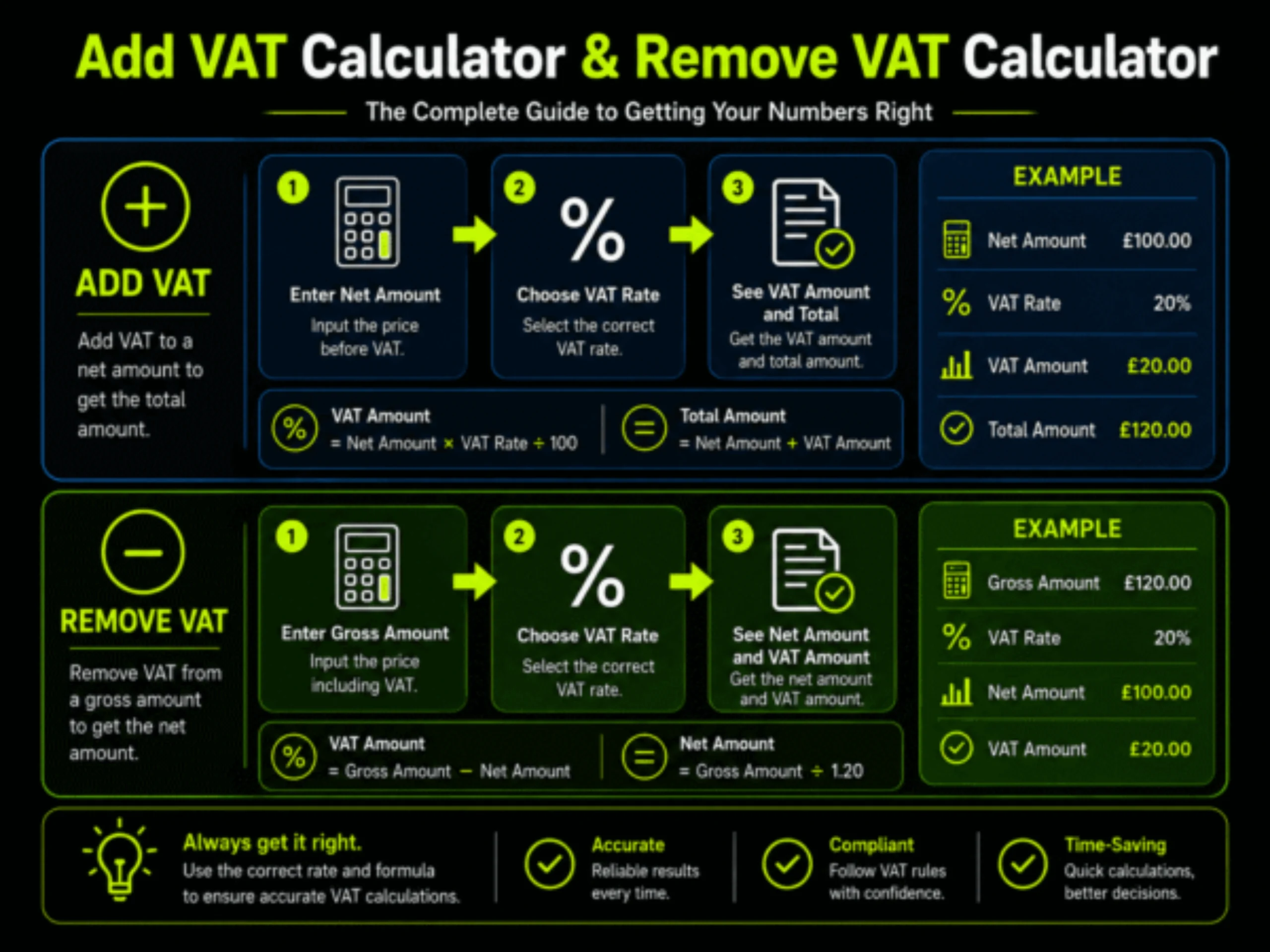
Quick example because numbers make it clearer. Say something costs $100 before tax. Your country’s VAT rate is 20%. You multiply $100 by 1.20 and get $120. Customer pays $120. You pocket the original $100, and the $20 goes to the tax man. Straightforward enough.
But here’s the thing. Business owners deal with this literally every day and still mess it up. You finish a project, you know your fee, and then you realize you need to figure out what the client actually owes after tax. Skip that step, and the government still wants its cut. Guess where it comes from? Your profit.
The math:
Gross Price = Net Price x (1 + VAT Rate / 100)
Want a real one? Net price of €500 with Belgian VAT at 21%. That’s €500 x 1.21 = €605. Your client pays €605. The €105 extra is VAT that you collect and forward to the tax authority when your return is due.
This is exactly what an add VAT calculator does. You punch in the net number, pick your percentage, and boom. Gross total and VAT amount shown separately. Two seconds. No mental math, no sweaty palms wondering if you rounded wrong.
Most people who search for “add VAT calculator” are in the middle of writing an invoice. They know what they charge. They just need the final number with tax included. Nothing fancy.
How Does Removing VAT Work? The Reverse Calculation Explained
Okay, so removing VAT is going the other direction. You have a price that already includes tax baked in, and you need to figure out what the original amount was before VAT got added.
And this is where things get messy for a lot of people. Because the obvious approach is wrong.
Look. If something costs £120 and it includes 20% VAT, your brain wants to go: “20% of 120 is 24, so the original price must be 96.” Nope. The actual original price is £100. You’re off by £4. On one transaction, that’s nothing. Do that across 200 invoices in a quarter, and your books are a disaster.
Here’s the right formula:
Net Price = Gross Price / (1 + VAT Rate / 100)
So £120 divided by 1.20 gives you £100. VAT was £20. Done.
Why doesn’t the subtraction work? Because VAT was calculated on the net price, not the gross. 20% of £100 is £20. That’s how you got to £120 in the first place. But 20% of £120 is £24. Different base, different result. It’s genuinely one of those things that feels like it should be simple but catches smart people all the time.
A remove VAT calculator handles this automatically. You type the gross amount, pick your rate, and get the net price plus the exact VAT breakdown. No division in your head required.
You’ll need this more than you think. The supplier sends a receipt and you need to separate the VAT for your reclaim. You see a price in a shop and wonder what part of it is actually tax. Your bookkeeper asks for net figures, but every number you have includes VAT. It comes up constantly.
Step-by-Step: How to Use a VAT Calculator (Add and Remove)
Not much to this, honestly. Once you’ve done it once, it takes about 10 seconds every time after.
Adding VAT:
Pull up any decent calculator. I like Wise and Calculator.net personally. Type in your net price (the before-tax amount). Choose “Add VAT” or whatever that tool calls it. Set your VAT rate, either by picking a country or typing a custom number. Click calculate. You’ll see the gross price and the VAT amount listed separately.
Say you make handmade candles and sell them for €25 net. VAT in your country is 19%. Enter €25, pick 19%, hit the button. You get €29.75 as the gross price and €4.75 as the VAT. That €29.75 goes on your invoice.
Removing VAT:
Put in the gross price this time. That’s the total with tax already in it. Select “Remove VAT” or “VAT Inclusive.” Set the rate. Calculate. Bought some office supplies for £180 with UK 20% VAT included? Punch in £180, set it to 20%, and you get £150 net with £30 being the tax. That £30 is what you potentially reclaim on your VAT return if you’re registered. Manual math works fine when you’re doing one or two calculations. But if you’re processing invoices regularly, rounding errors start adding up. A calculator keeps things clean
The Exact VAT Formulas You Need:
I’m going to lay these out one by one with numbers attached. That way, you can grab whichever one you need and double-check it against your own calculations.
Adding VAT to a net price:
Gross = Net x (1 + Rate/100)
Say your net is $200 and the rate is 15%. Do $200 x 1.15 and you get $230. The $30 difference is your VAT.
Finding just the VAT amount from a net price:
VAT = Net x (Rate/100)
Same numbers. $200 x 0.15 = $30. That’s it.
Removing VAT from a gross price:
Net = Gross / (1 + Rate/100)
Gross is $230, rate is 15%. $230 / 1.15 = $200. VAT was $30
Pulling the VAT out of a gross price directly:
VAT = Gross – (Gross / (1 + Rate/100))
$230 – ($230 / 1.15) = $230 – $200 = $30.
Now here’s a couple of shortcuts I actually use.
UK 20% VAT shortcut:
Divide the gross by 6 to find the VAT portion. Why? Because at 20%, exactly one-sixth of the gross price is tax. So £120 / 6 = £20. Quick mental math for when you’re looking at a receipt and don’t feel like pulling up an app.
UAE 5% VAT shortcut:
Divide the gross by 21. Sounds weird, but the math checks out. 5/105 simplifies to 1/21. So AED 105 / 21 = AED 5.
These are handy for rough estimates. For actual invoices, use the full formula or a proper calculator. You don’t want to explain rounding differences to a tax inspector.
VAT Rates by Country: A 2026 Reference for Common Markets:
The range is kind of wild honestly. Hungary’s sitting at 27% while the UAE charges just 5%. And then there are countries with three or four different rates depending on what you’re selling. Makes things fun.
Let me run through the ones people actually ask about.
Europe:
it has the highest rates overall. Hungary leads at 27%. Croatia, Denmark, and Sweden come in at 25%. Finland bumped theirs to 25.5% not too long ago. Spain, Belgium, and the Netherlands are around 21%. Germany uses 19% standard but has a reduced 7% tier for stuff like books and restaurant food (that restaurant bit changed in 2026). The UK is 20% with a reduced 5% on home energy and children’s car seats. Luxembourg sits lowest in the EU at 17%. Malta at 18%.
Middle East:
is much simpler. Saudi Arabia went from 5% to 15% back in 2020 and stayed there. UAE, Bahrain, and Oman all charge 5%. Qatar and Kuwait? No VAT at all. At least not yet.
Asia-Pacific:
is a mixed bag. India runs a GST system with four tiers: 5%, 12%, 18%, and 28%. Depends on the product. Australia charges 10% GST. New Zealand 15%. Japan has 10% with a reduced 8% rate for food and drinks. Singapore charges 9%.
Americas:
get complicated. Canada has a 5% federal GST and then provinces add their own on top. Ontario ends up around 13%, some provinces hit 15%. Brazil doesn’t even have one national VAT. They use state-level systems that sit around 17-20%. Argentina charges 21%.
Africa:
varies too. South Africa at 15%. Kenya 16%. Nigeria 7.5%. Ghana technically says 15% but once you add the health and education levies it’s closer to 20% effective.
And these rates shift. Estonia went from 22% to 24% in July 2025. Romania jumped from 19% to 21% in August 2025. If you’re invoicing internationally, check the current rate before every invoice. Not last month’s rate. Not what you remember from a blog post. The actual current rate from the tax authority’s website.
Why You Can’t Just Subtract the Percentage:
People often make the mistake of simply subtracting the VAT percentage from the total price, but that gives the wrong result because VAT is calculated on the original net amount, not the final gross amount. For example, £600 including 20% VAT doesn’t mean the net is £480 — the correct net is £500, and the VAT is £100. To remove VAT properly, divide the gross price by (1 + VAT rate), such as dividing by 1.20 for 20% VAT. The key takeaway is that adding and removing percentages are not reverse actions because they are calculated from different base values.
How to Calculate VAT in Excel and Google Sheets:
If you handle more than maybe five invoices a month, a spreadsheet template will save you a surprising amount of time. And once you set it up, you basically never touch it again.
To add VAT in Excel:
Put the net price in A1. VAT rate goes in B1 as a plain number (like 20, not 0.20). Then in C1:
=A1*(1+B1/100)
That’s your gross amount. Want just the VAT portion? In another cell:
=A1*(B1/100)
To remove VAT:
Gross price in A1. Rate in B1 again. For the net:
=A1/(1+B1/100)
For the VAT amount:
=A1-A1/(1+B1/100)
Making a reusable template:
I usually set it up with columns for description, amount, rate, net price, VAT, and gross. If you use the same rate for everything, lock the rate cell with dollar signs like $B$1. Then changing one cell cascades through every row. Saves a ton of editing.
Google Sheets works the exact same way. Copy-paste the formulas, no changes needed.
For people who deal with volume (think 50+ invoices monthly), accounting tools like Xero and QuickBooks handle VAT automatically. They know the rate based on your location and product type. FreeAgent does something similar for freelancers. Enerpize has been getting popular for smaller operations, too. But a spreadsheet works perfectly fine until you outgrow it.
VAT for Freelancers: When to Add VAT and When You Don’t Need To
This is where it gets personal for a lot of people. Because freelancers sit in this weird middle ground where some of you need to charge VAT and some don’t. Depends on a few things.
UK freelancers: you have to register once your taxable turnover goes past £85,000 in any rolling 12-month window. Below that, registration is optional. Some people register voluntarily, though, even with lower revenue. The upside is you can reclaim VAT on all your business expenses. Equipment, software, and rent. That reclaim adds up if you’re spending a lot on gear.
Once you’re registered, every invoice to a UK client gets VAT on top. But if your client is a VAT-registered business in another country, you might not charge VAT at all. The reverse charge kicks in. You send the invoice without VAT, and they handle it on their own return. Weird system, but it works.
Reverse VAT Explained: What It Is and Who Uses It
I should clear something up because people confuse two different things here.
“Removing VAT from a price” is just math. You have a gross number and you want the net. That’s the formula we already covered.
“Reverse charge VAT” is a completely different thing. It’s a tax mechanism where the buyer handles the VAT instead of the seller. The seller sends an invoice with no VAT on it. The buyer then reports both the input and output VAT on their own return. It nets out to zero for the buyer if they can reclaim input VAT, but the paperwork still needs to happen.
You see reverse charge mostly in cross-border B2B deals. A UK agency hires a Dutch developer. The developer invoices without Dutch VAT. The UK agency accounts for UK VAT on the transaction through the reverse charge. Nobody falls through the cracks
VAT vs. Sales Tax: Why Americans Get Confused
Quick detour for the US folks reading this. America doesn’t have VAT. You have state and local sales tax instead. And they’re not the same thing even though they feel similar at the register.
Sales tax hits once. At the final sale to the consumer. Nobody else in the chain pays it.
VAT hits at every stage. The farmer, the manufacturer, the wholesaler, the retailer. Everyone charges VAT. But everyone also reclaims the VAT they paid at the previous stage. So the actual tax burden lands on the final consumer, same as sales tax. The difference is just how the money flows through the system.
5 Real-World Scenarios Where You Need a VAT Calculator
Alright enough theory. Here’s what this looks like in actual situations.
Best Online VAT Calculators Worth Bookmarking
I tested a bunch of these. Some are great, some are garbage. Here’s what actually worked.
Stripe
has a solid VAT calculator that pulls rates from their compliance database. Always current. The interface is dead simple. If you already use Stripe for payments, this is a no-brainer.
Calculator.net
goes deep. Not just the calculator itself, but the explanations around it. Good for someone learning VAT for the first time. Handles custom rates and multiple currencies without fuss.
OmniCalculator
shows its work. It actually walks you through the formula step by step. Accountants love this because they can verify the math, not just trust a number.
Wise
combines VAT calculation with currency conversion. Super useful when you’re invoicing in euros but tracking in pounds or the other way around
FreeAgent
is aimed at small business owners and freelancers. The calculator itself is basic but it ties into their accounting software. So your VAT gets calculated automatically on every invoice once you set it up.
Common VAT Mistakes That Cost Businesses Real Money
Besides the subtraction error I already went off about, there are several other ways people mess this up.
Applying the wrong rate is probably the second most common one. Germany has 19% standard but 7% for food, books, and public transport. Sold an ebook in Germany at 19% when it should’ve been 7%? Now you’ve overcharged every customer and need to sort out refunds. Always check the specific product category, not just the country.
Blowing past the registration threshold without noticing. You crossed £85,000 six months ago but didn’t register. The tax authority doesn’t care that you missed it. They can backdate your obligation and demand VAT on every sale since you should have been registered. Plus interest. Plus penalties. Track your rolling turnover. Set an alert at 80%.
Getting place of supply wrong. A lot of people assume they always charge their home country’s rate. For digital services sold to consumers abroad, you often charge the buyer’s local rate instead. UK SaaS companies selling to EU consumers get tripped up by this regularly.
Confusing inclusive and exclusive pricing. Your website says £100. Does that include VAT or not? If it’s net and you add 20%, the customer owes £120. If it’s gross and the customer assumed £100 was the total, your net is only £83.33. Spell it out. “Prices exclude VAT” or “All prices include VAT.” Don’t leave it ambiguous.
Leaving input VAT on the table. You’re registered. You buy stuff for your business. That stuff includes VAT. You can reclaim that tax. I’m always surprised by how many registered businesses don’t bother because they think it’s too much hassle. It’s money you already paid that you’re entitled to get back. Keep your receipts.
Rounding inconsistencies across invoices. Do you calculate VAT per line item or on the invoice total? Both methods are usually acceptable. But if you switch between them randomly, your totals won’t match up neatly. Pick one method and stick with it. Auditors notice inconsistency.
How to Handle VAT When You Import or Export Goods
Physical products across borders add another layer that digital stuff doesn’t have.
Exporting from a VAT country? Exports are usually zero-rated. You invoice without adding VAT. But you can still reclaim the VAT you paid on materials and production costs. Makes exporting pretty tax-friendly, actually.
Importing into a VAT country? You’ll get hit with import VAT at the border. Usually, the standard rate is applied to the goods’ value plus any customs duties on top. In the UK, you pay this to HMRC when the goods arrive. If you’re VAT-registered, you reclaim it as input VAT on your next return.
Within the EU it works differently. Goods moving between member states don’t go through traditional import VAT. The buyer reports acquisition VAT on their return instead. Keeps things flowing without border delays..
Frequently Asked Questions!!