Gross to Net VAT Calculator: Remove VAT from Total Price
Gross to Net VAT Calculator: Calculate VAT and Profit Accurately
Gross to Net VAT Calculator: Stop Guessing and Start Calculating Correctly:
A practical guide for business owners, freelancers, and anyone tired of getting VAT wrong.
Let’s be honest. VAT confuses most people. Not because it’s difficult in theory, but because when you’re checking invoices late at night or trying to balance accounts quickly, gross and net figures start blending. That’s usually when mistakes happen.
A gross-to-net VAT calculator solves that problem instantly.
Whether you’ve been running a business for years or recently registered for VAT, this tool helps you save time, avoid errors, and make sure your figures are accurate before reporting them to HMRC. In this guide, you’ll learn exactly what the calculator does, why it matters, and how to use it properly.
What Is the Difference Between Gross and Net?
This is the part that confuses most people, so let’s simplify it.
Net Price:
The net price is the amount before VAT is added. This is your actual revenue as a seller.
Gross Price:
The gross price is the final amount the customer pays, including VAT.
For example:
- Net Price = £100
- VAT (20%) = £20
- Gross Price = £120
Many people see £120 entering their account and think they earned £120. In reality, only £100 belongs to the business. The remaining £20 must eventually be paid to HMRC.
Understanding this difference is important because it affects:
Financial reporting
Profit calculations
Pricing decisions
VAT returns
Why Businesses Use a Gross to Net VAT Calculator:
Filing VAT Returns:
When submitting VAT returns, businesses must report accurate VAT figures.
If your accounting software stores amounts as gross values, you’ll need to reverse-calculate them before filing. A VAT calculator makes this process quick and reliable.
Checking Real Profit Margins:
VAT can distort your understanding of profit.
Example:
- Selling price including VAT = £60
- Actual revenue excluding VAT = £50
- Product cost = £45
Your real profit is only £5, not £15.
Without removing VAT correctly, your profit margins may appear larger than they actually are.
Verifying Supplier Invoices:
Supplier invoices sometimes contain calculation mistakes.
A VAT calculator allows you to quickly check whether:
- The VAT amount is correct
- The net figure matches the percentage applied
- You are reclaiming the right amount of input VAT
Pricing Products and Services:
Businesses often need to switch between net and gross pricing.
Example:
- Desired net income = £500
- VAT at 20% = £100
- Final customer price = £600
Or the reverse:
If a client’s budget is £600, you can calculate your actual net revenue instantly.
Understanding UK VAT Rates:
Many people assume all VAT is charged at 20%, but that isn’t always true.
Standard Rate: 20%
Applies to most goods and services.
Reduced Rate: 5%
Used for selected categories such as:
- Home energy
- Children’s car seats
- Certain renovation work
Zero Rate: 0%
Applies to items like:
- Most food
- Books
- Children’s clothing
It’s important to remember:
- Zero-rated items are still VAT-taxable at 0%
- Exempt items are treated differently for VAT recovery purposes
A good calculator should support multiple VAT rates, not just 20%.
Common VAT Mistakes That Cost Money:
Calculating VAT Incorrectly from Gross Prices:
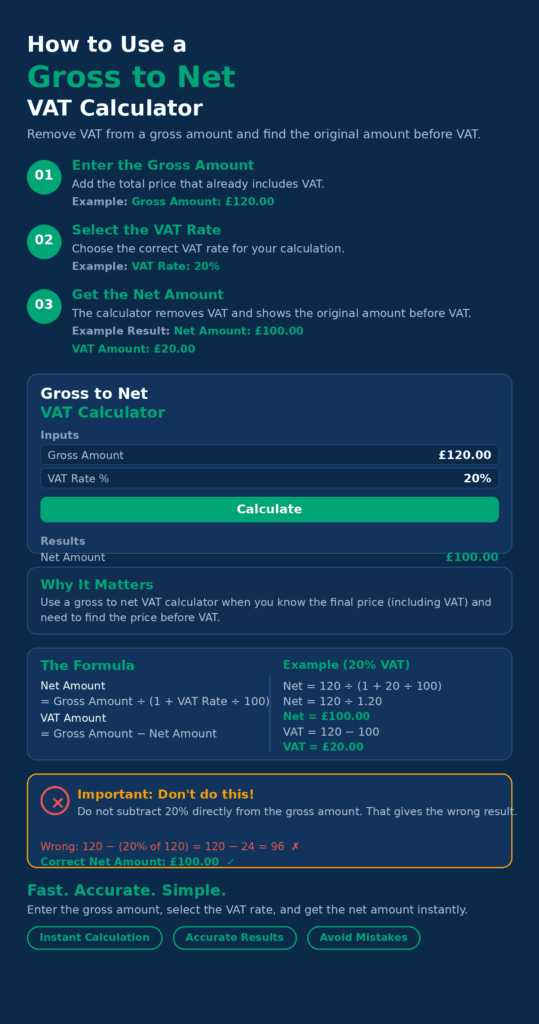
Many people calculate 20% directly from the gross figure.
Example:
- Gross = £120
- Incorrect method: 20% of £120 = £24
- Correct VAT = £20
You must divide by 1.20 first.
Recording Gross Figures as Revenue:
If gross figures are entered as income in accounts, profits become inflated and misleading.
Using the Wrong VAT Category:
Charging the wrong VAT rate can result in:
- Overcharging customers
- Incorrect VAT returns
- Accounting issues later
Leaving VAT Until the Deadline:
Trying to reconcile months of transactions at the last minute increases the risk of mistakes.
Monthly reconciliation is much easier and more accurate.
How to Use a Gross to Net VAT Calculator:
Using the calculator is very simple.
Step 1: Enter the Gross Amount:
Input the total amount including VAT.
Step 2: Choose the VAT Rate:
Select the correct VAT percentage for the product or service.
Step 3: Calculate:
The calculator automatically displays:
- Net amount
- VAT amount
Step 4: Use the Results:
You can then:
- Update accounts
- Check invoices
- Complete VAT returns
- Review profit margins
Manual VAT Calculation Shortcut:
If you don’t have access to an online calculator, you can still work it out manually.
Standard 20% VAT
Net=Gross1.20\text{Net} = \frac{\text{Gross}}{1.20}Net=1.20Gross
Reduced 5% VAT
Net=Gross1.05\text{Net} = \frac{\text{Gross}}{1.05}Net=1.05Gross
Then subtract the net amount from the gross amount to find the VAT.
Who Should Use a Gross to Net VAT Calculator?
This tool is useful for:
- VAT-registered businesses
- Freelancers
- E-commerce sellers
- Accountants
- Bookkeepers
- Amazon and Etsy sellers
- Businesses dealing with supplier invoices
Even non-VAT-registered individuals can benefit from understanding how VAT affects pricing.
Final Thoughts:
VAT calculations don’t need to be stressful.
A gross to net VAT calculator helps businesses:
- Avoid costly mistakes
- Save time
- Improve accuracy
- Understand real profits
- File VAT returns correctly
If you’ve been estimating VAT manually or relying on rough calculations, switching to a calculator is one of the easiest ways to improve your financial accuracy.
Reliable numbers lead to better decisions, cleaner accounts, and fewer problems later.